
Overview
For this unit, we have had to look into several different jobs that are in the games industry.
Research
For the research that is going into this, I will be looking at sites such as Hitmarker which showcase a lot of different potential jobs and what companies are currently hiring for the given positions.
I will mainly be looking into companies that I already know or have played their games as I feel that it is important for the employee to have a connection with the company that they are working for; especially in the games industry.
Some of the positions that I have looked into specifically are for seniority working in the games industry however there are lower requirement options that exist
- https://hitmarker.net/jobs/sperasoft-game-qa-engineer-1656497
- https://hitmarker.net/jobs/larian-studios-engine-programmer-1613805
- https://hitmarker.net/jobs/cd-projekt-red-senior-engine-programmer-1648195
- https://hitmarker.net/jobs/rockstar-games-engine-programmer-1656978
- https://hitmarker.net/jobs/larian-studios-tools-programmer-1614755
- https://hitmarker.net/jobs/riot-games-software-engineer-iii-gameplay-systems-unpublished-r-d-product-1640755
Looking at the postings, these just give me an idea of what the market offers, I also had to do research about the indsutry salaries in the UK, at avery base entry-level position the salary is anywhere between £19k-£25k increasing with seniority in the industry reaching anywhere between £50k-£70k+.
These roles have the responsibility of maintaining frameworks and working on tools to be used by coworkers, your responsibility is also to debug code and to respond to any bug reports that break the game to keep it running smoothly.
A lot of these roles require years of experience in at least 1 language such as C++ or C# depending on the studio’s preferred game engine.
A way of getting into these jobs in the industry is mostly through networking and knowing people who are already in the industry. The industry itself is infamous for being very closed and preferring to hire from people who already work in the company rather than openly recruiting as it is an easier process for both the employer and employee. Another way of getting into these industries is going through higher education such as university which can go into the games industry as courses such as those give good experience and game studios often talk to games education institutions.
I have always wanted to work in the software and backend side of development, whether its engine work or games programming I have always had an interest in pushing the limits of theoretical physics in games as well as working with code to create such games.
Plan
My plan is to create a very small demo for a game created using the Unity Engine.
This is going to be a Flappy Bird style side scroller where the player has to navigate through top and bottom objects, pressing space to do so.
The practical outcome of this project is a simple test to myself that I can give myself a high time constraint with a program that I don’t have proficiency with in an attempt to learn and better myself with as minimal help from outside sources as possible and trying to figure out everything on my own to showcase true problem solving capabilities to work in an industry-grade team. This can also be used to be showed to a University or small indie team to showcase those problem solving capabilities and beyond-basic comprehension of the engine.
For the production of the game, I will be setting myself a challenge of only giving myself 24 hours – Very similar to a style to a Game Jam, a type of casual game dev competitions which give people a very limited time constraint to create a game. These events are frequently hosted on Itch.io and are some of the best ways to put yourself into game dev communities for further networking.
My software choice for this project is going to be Unity Engine because I have used it very briefly in the past to experiment on previous projects so I know the very basics of how the engine itself works when it comes to game programming. I will be able to work on this project at home.
I hold myself to a high standard when it comes to file management and naming conventions inside of projects as to not lose track of any of the objects within the game. This is why I hold all of my College Projects and Personal Projects in their own separate and respective folders as well as down to what engine I am using to create the project as well as dividing projects that are in development and packaged versions of finished projects. I also very often create a separate folder in assets that separate my own assets that I’ve made from pre-made assets imported from somewhere else or ones that were already included in the files.
Health and safety considerations:
Seeing as I am only giving myself 24 hours to figure out and how to create a whole game from scratch in Unity without tutorials, there is very clear stress factors to take into account as well as the fact that at minimum 6-8 hours of the 24 sleeping to not over-exhaust my self. I will give myself frequent breaks in order to keep my mind focused and fresh at a ratio of 5 hours of work = 2 hours of break that can be broken up into segments no shorter than 15 minutes.
Production Schedule
First 2 hours – starting, getting familiar with Unity again and asset creation
Hour 3 – Break
hour 4 – setting up IDE (JetBrains Rider) as well as getting familiar with the functionalities of C# again
Hour 5 – creating the first object and coding its functionality.
6-13h – Sleeping
14h – reading Unity engine documentation and creating randomised pipe creation
16h – work on creating a score counter
17h – debugging (if any)
18h – attempting to add a main menu for the start of the game.
19-21h – break + final touches + packaging and finishing
Production
For the production stage of this unit, I decided to make a prototype game, very similar to the likes of Flappy Bird as I figured that it was very simple and easy to do within the time limit that I’ve set myself.
For my IDE, I also decided to use JetBrains’ Rider as it is just up to personal preference as I have used JetBrains products such as IntelliJ in previous personal projects.
Over the course of the 24 hours that I have given myself, I would like to think that I stuck to my own given schedule with efficiency and care. Only giving myself those allotted “time slots” to do exactly what I needed to do. I made sure to keep a careful balance of breaks and work as to not burn myself out and I had kept a timer on me at all times to keep track of time between each activity.
First in my projects, I created art for the actual assets that I was going to use in my project, I made these using Krita as it my preferred artistic program to use.

This is the art for the Bird asset, the artistic decision behind the bird being an unrealistic pink is that the game is designed for all ages to play and enjoy so the vibrant colour add inclusivity for the audience.

This is the art for the Pipe asset, I wanted to keep the design of these two as simple as possible as to have more time in creating the code as I was nervous about the time management when it comes to relearning code languages and their proper uses.
I began by writing the code for the bird, I created a physics component for the bird so that the bird will continuously fall as if it was affected by gravity.
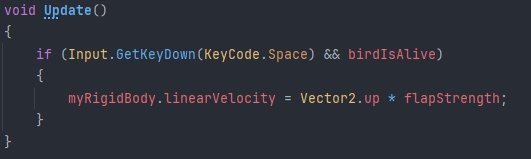
I then had to attach the physics component to the script so that the script could actually talk to the physics component and detect that whenever the player presses ‘Space’ the bird would fly up.
For this, I also created a ‘flapStrength’ variable so that I can tweak how much power the bird flies up with when the player presses space.
It should also be noted that in this project, I am using Unity’s old input system as it is simpler to use and I do not know how the newer “Player Input Packaging” input system works.
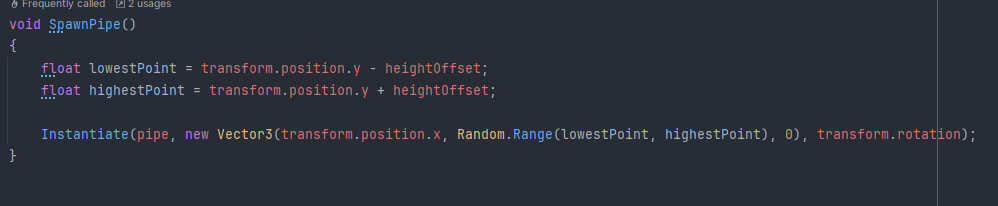
Here, I created a function which takes and randomises a random position on the Y axis in the scene and creates a “Prefab” (prefabricated object) at random points in the Y axis. There is also code in the pipes for them to be moving at a fixed rate on the X-axis without them changing their Y position. I made the movement of them run on ‘deltaTime’ as it would mean that the speed of the pipes change and vary depending on the performance of the player’s computer which creates imbalances when it comes to the game as it may be unplayable for some.

This is the Prefab for the pipes, note the green block representing a box collision which when interacting with the Bird object, increases the score counter (mentioned later)
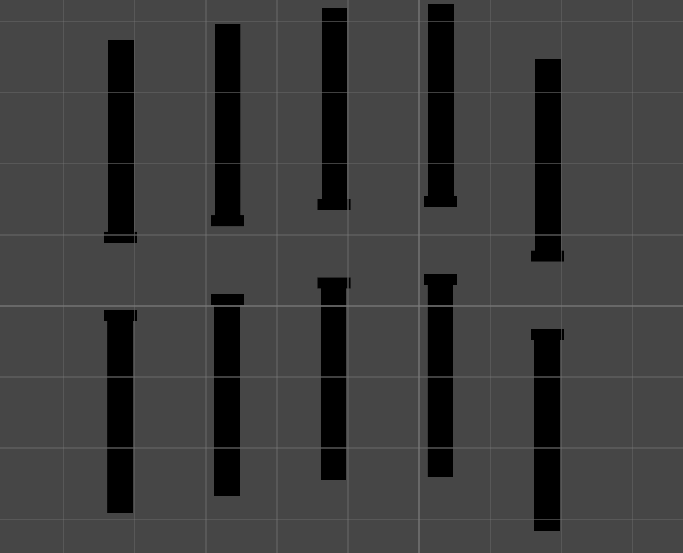
^ Image showcasing randomised pipe spawns
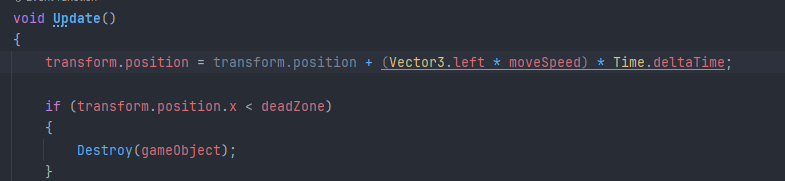
Earlier in the production I talked about pipes that get created and move on the X-Axis towards the bird and past it but that can cause issues when the player is playing for a long amount of time as in theory, the pipes will keep being created forever with nothing stopping there being too many pipes in one instance of the game. Therefore I created a simple threshold that when the pipes reach a certain point in the game’s calculated X-Axis, the pipes will destroy themselves.
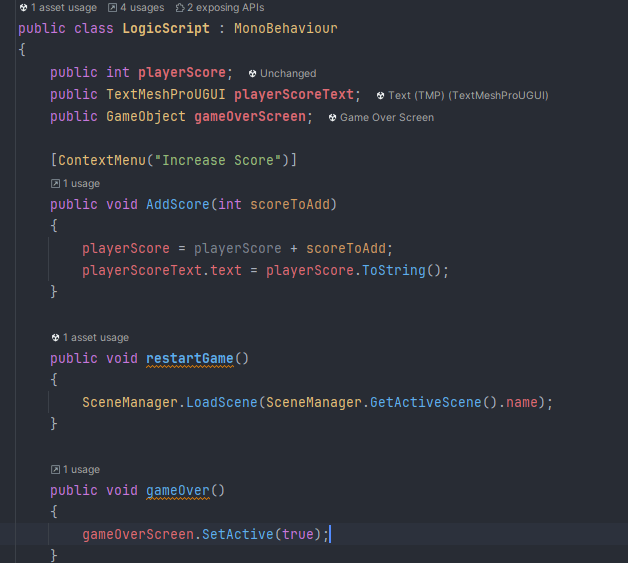
This is the code for my ‘Bulk Logic’, a game component which holds most of the game’s running logic and functionalities. I didn’t want to create too many different code assets so I created one ‘Master Logic’ that allowed most of the logic needed in the project to run in one simultaneous component.
This components runs the checks for the game being over, the creation of the game over screen, restarting the game upon death, as well as also running the code for increasing the score when the player makes it through a set of pipes.
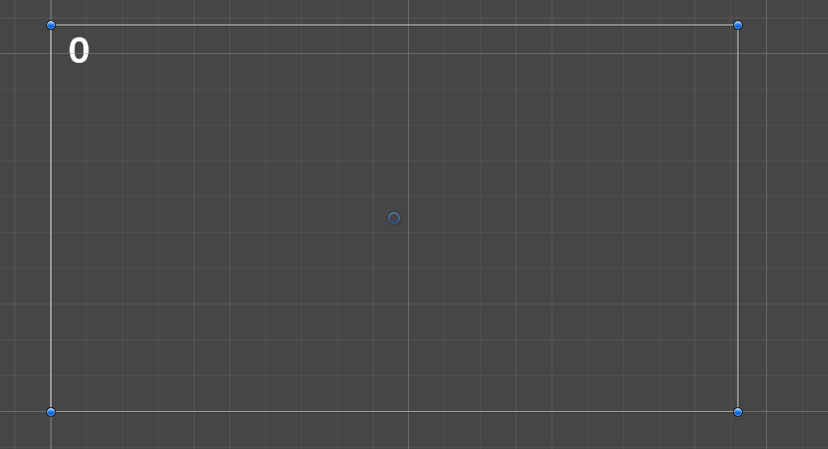
This shows the UI component that I added which shows the screen and the ‘0’ represents where the score counter is.
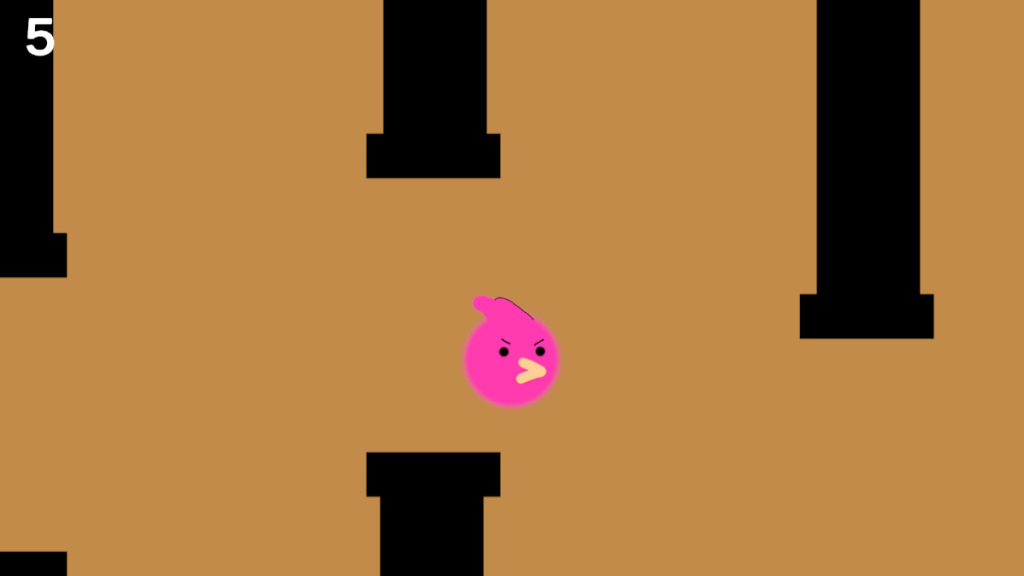
This is a screenshot of my game in action, the player having gone through a couple pipes and the score counting so and keeping track; the randomised pipe generation that give the game actual difficulty rather than it being one continuos tunnel that the player has to get through – that’d make for a boring game.
Reflection
Over the course of the last 24 hours as well as the previous amount of time in which I have researched several potential specific career choices within the games industry, I have learnt past the basic functionalities of the Unity Engine and while I do still believe that there is a lot for me to learn about it, I think that it is very valuable to have a level of proficiency in several languages and/or engines as it may lead to increased employability. The process of research and production was very fun in my opinion and the process of using Unity felt a lot easier and simpler rather than the use of the Unreal Engine in my Unit 7 work. The process was more streamlined and the production phase was easier to handle past the 5th hour of work once I had begun creating code for objects. Overall I am very happy with how this project turned out and I had definitely surprised myself with my own problem solving skills where I researched different documentation sites for the use of Unity and the functionalities of C# and managed to apply them in my own code rather than looking at and copying YouTube tutorials without thinking about them and the actual functionality of the code that is being written. Comparing Unity to Unreal The learning curve to get started on Unity would be harder than Unreal as it was more overwhelming at the start, however Unity is a lot more easier to get started on when you familiarise yourself with the workings of it and when you learn some of the basic functions of C# you can get progress snowballing really fast with Unity.
I also uploaded the game on Itch.io for other people to play it; I might look at potentially update it in the future to add some missing features that I didn’t have time to add in the 24 hours / couldn’t figure out without a tutorial.
Play it here: https://thewisemogy.itch.io/bird-game

